Bots Overview
Bots are the core unit of automation in hidettp. Each bot targets a specific website and contains the instructions, configuration, and history needed to automate interactions with that site.
What Bots Do
A bot is a self-contained automation package. It holds:
- A target URL -- the starting page for the automation.
- A script -- Python code (or recorded steps converted to code) that controls a Chrome browser.
- Configuration -- proxy, stealth, locale, timeout, webhook, and other settings.
- Execution history -- a log of every run, with status, timing, extracted data, and video recordings.
Bots can extract data from pages, fill out forms, navigate multi-step workflows, solve captchas, download files, and more. They run on stealth-configured Chrome instances with anti-detection built in.
Bot Lifecycle
Every bot follows the same lifecycle:
- Create -- Define the bot's name, target URL, type, and description.
- Configure -- Set up browser identity, proxy, stealth options, webhooks, and execution parameters in the Settings tab.
- Script -- Write a script manually, record it visually, or generate it with AI. This is what the runner executes.
- Execute -- Run the bot manually, on a schedule (extraction bots), or via API (action bots). A runner picks up the execution and processes it.
- Monitor -- Watch the execution in real time, review logs, inspect extracted data, and debug failures.
Dashboard View
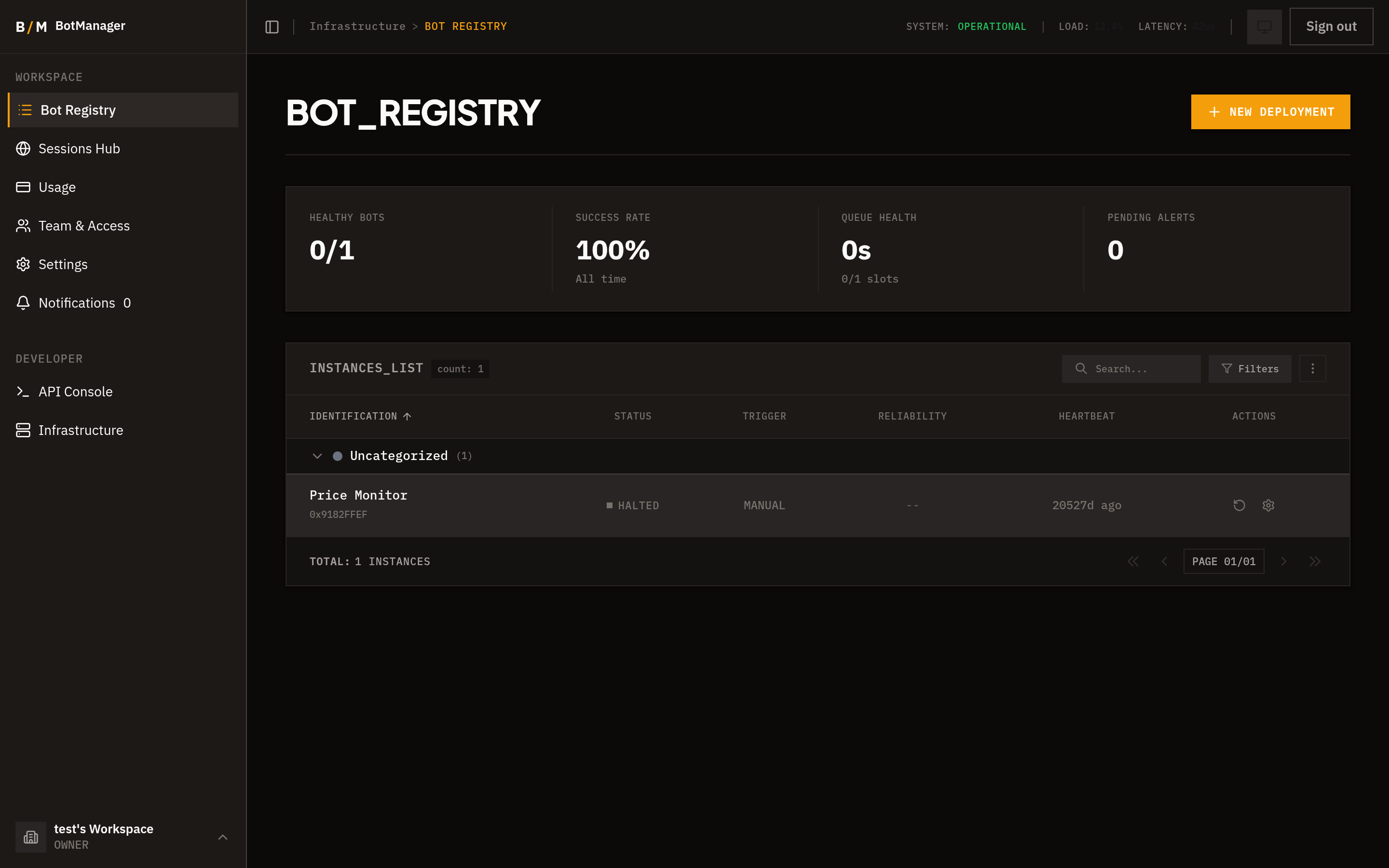
The Bot Registry dashboard gives you an at-a-glance view of your entire automation fleet.
Stats Bar
At the top of the dashboard, summary metrics show:
- Healthy bots -- Bots whose recent executions succeeded.
- Success rate -- The percentage of successful executions across all bots.
- Queue health -- How many executions are pending or processing.
- Alerts -- Bots that have recently failed or need attention.
Bot Table
The main table lists all bots with:
- Bot name and target URL.
- Current status and health indicator.
- Last execution time and result.
- Schedule indicator (if configured).
- Tags and category.
You can search by name, filter by type, status, tag, or category, and sort by any column. Category grouping lets you collapse related bots into sections.
Tag Badges
Tags appear as visual badges on each bot row, making it easy to identify bots by purpose, team, or priority at a glance.
Bot Detail Page
Click any bot to open its detail page. The detail page has four tabs:
Executions
The execution history for this bot. Shows every run with its status, start/end time, duration, and extracted data count. Click an execution to see full logs, step-by-step progress, extracted data, downloaded files, and a video recording of the browser session. You can trigger a new run from this tab.
Script
The Monaco-based code editor where you write and edit the bot's Python script. Includes syntax highlighting, auto-save, multi-file support, versioning, and the AI assistant chat panel. See Script Editor for details.
Record
The visual browser recorder. Opens a live Chrome session where you interact with the target website, and hidettp captures each action as a replayable step. See Visual Recorder for details.
Settings
All bot configuration: identity, stealth, proxy, display, execution parameters, and webhooks. See Bot Settings for details.